Slair: Managing an Airtable Base Without Leaving Slack
A slash command, a dozen Slack dialogs, and the 5-field limit that shaped half the architecture.
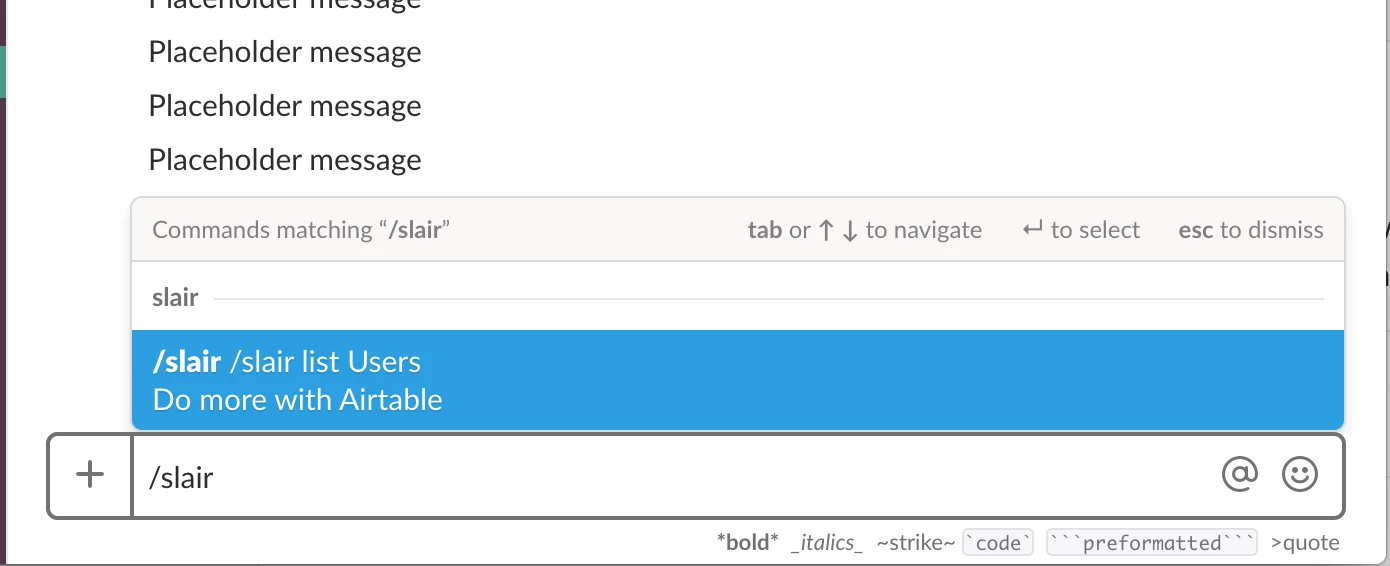
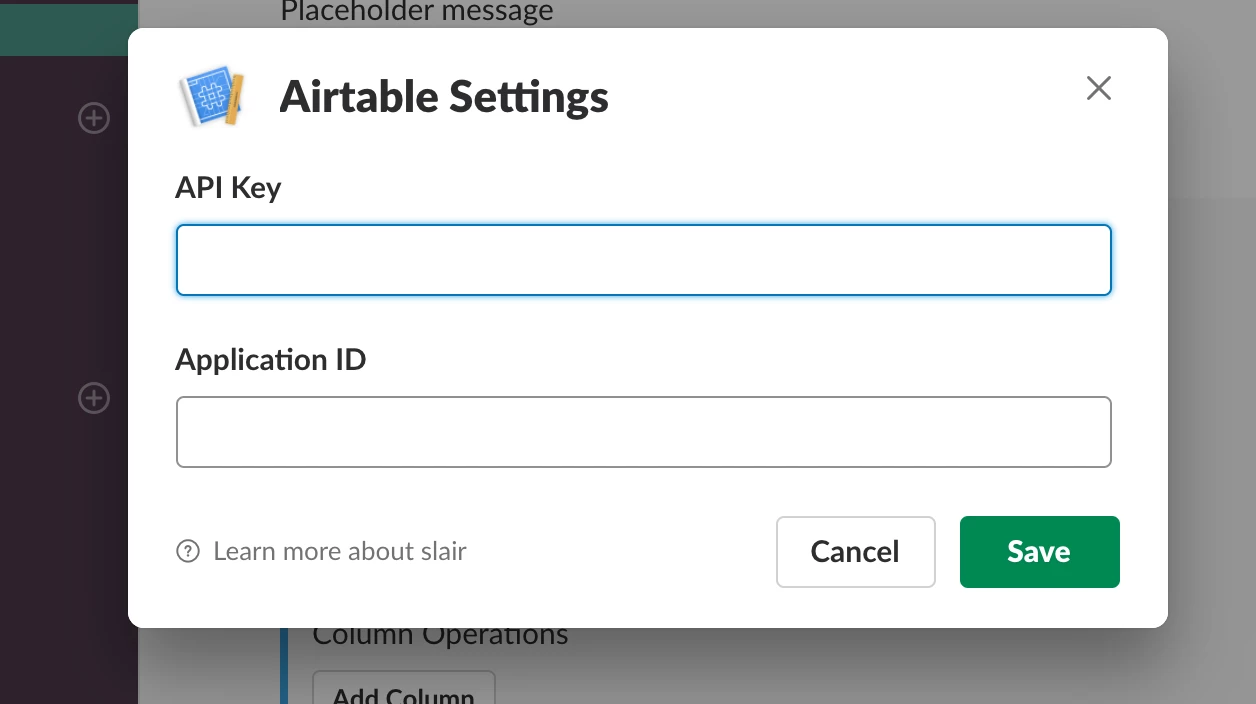
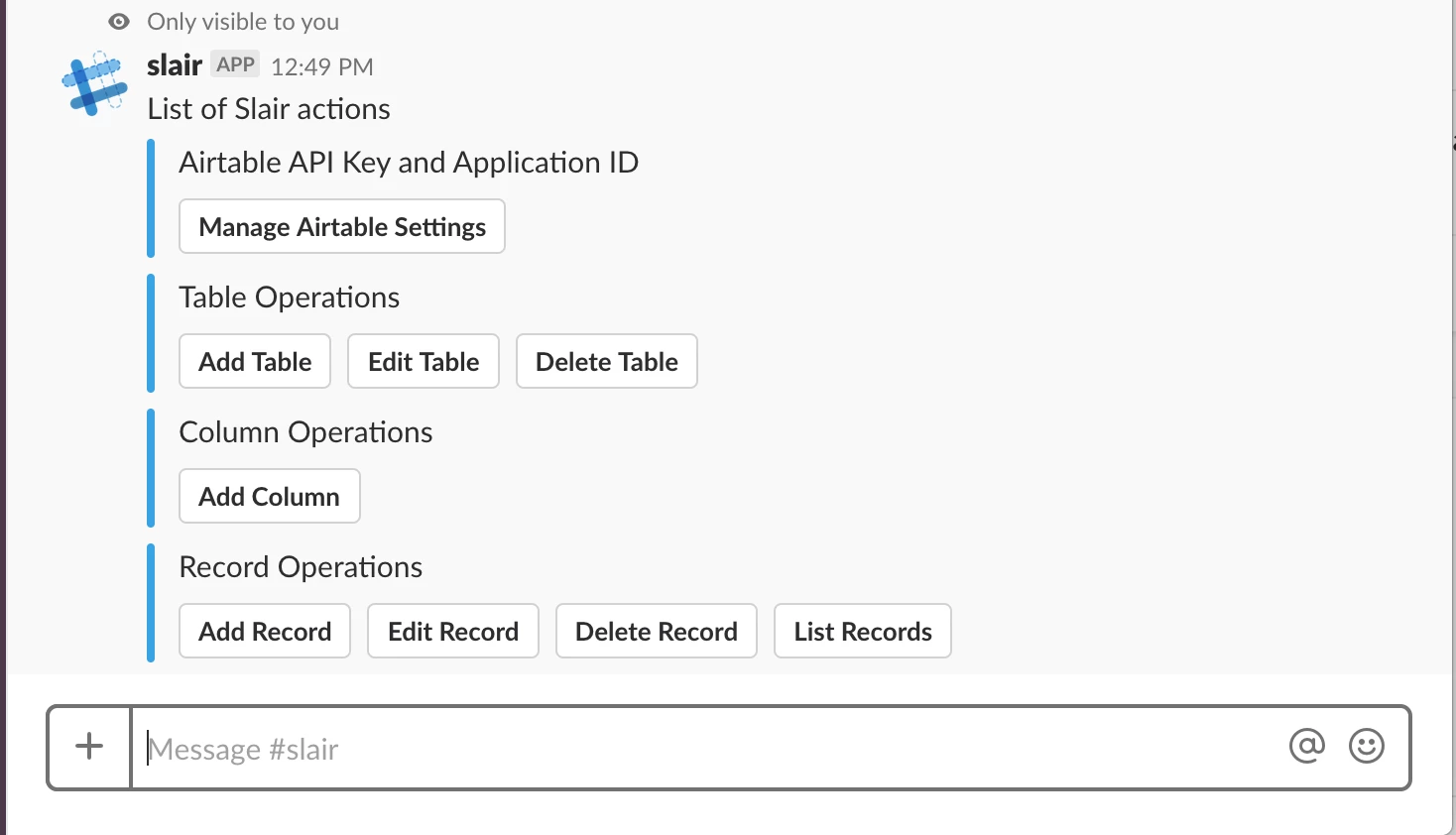
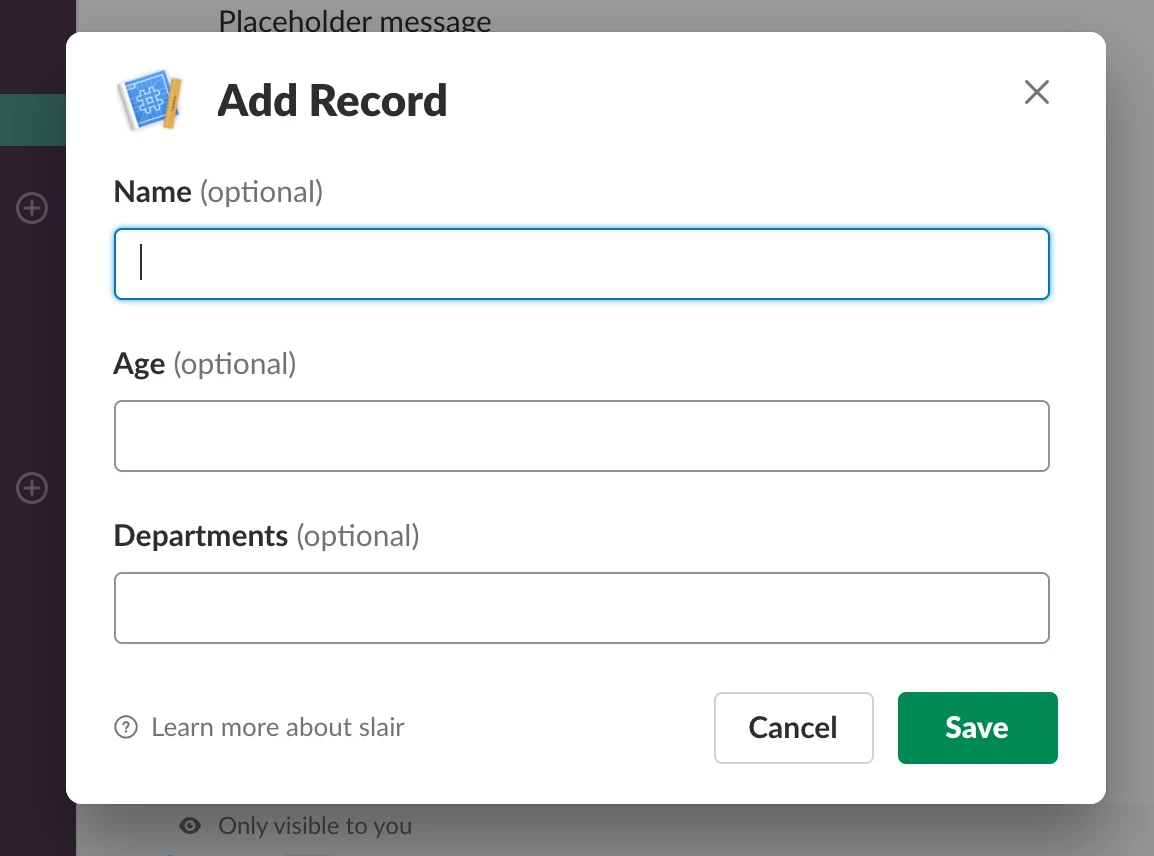
Slair is a Slack app that lets you manage an Airtable base without leaving Slack. Typing /slair in any channel brings up a menu of actions: connect an Airtable base by pasting in an API key and application ID, add, edit, or delete tables, add columns, and add, edit, delete, or list records — each one handled through a Slack dialog rather than switching over to Airtable's own interface. It was released as a beta at slairapp.com in late 2018.
The Slash Command Is Just a Menu
Slack slash commands have to respond within 3 seconds, so /slair doesn't try to do anything immediately — it posts a message back to Slack's response_url with a set of buttons for the real actions:
exports.slashCommand = async (req, res, next) => {
  const userObject = req.user && req.user.toObject();
  var responseURL = req.body.response_url
  const userName = _.get(userObject, 'user.name', 'there');

  var message = {
    "text": `Hi *${userName}*. Here's a list of actions that you can perform`,
    "attachments": [
      {
        "fallback": "API Key, Application ID or Metadata(Schema) missing",
        "color": "#36a64f",
        "attachment_type": "default",
        "actions": [
          {
            "type": "button",
            "text": "Manage Airtable Settings",
            "style": "primary",
            "url": isLocalRequest ? "http://localhost:3000/schema" : "https://www.slairapp.com/schema"
          }
        ]
      },
      {
        "text": "Record Operations",
        "callback_id": "record_operations",
        "actions": [
          { "name": "record_add", "text": "Add Record", "type": "button", "value": "record_add" },
          { "name": "record_list", "text": "List Records", "type": "button", "value": "record_list" }
        ]
      }
    ]
  }

  sendMessageToSlackResponseURL(responseURL, message)
  res.status(200).end()
}
Two Accounts Before Any Command Works
Every request first signs the user in with Slack, but that alone isn't enough — Slair also needs an Airtable API key, application ID, and a cached copy of the base's full schema before it can build anything. A middleware checks for all three and, if any are missing, short-circuits with an onboarding prompt instead of running the actual command:
exports.handleNewUser = async (req, res, next) => {
  const user = req.user;
  const airtableSettings = await airtableSettingsHelpers.getAirtableSettings(user);
  let apiKey, applicationId, fullSchema;

  if (airtableSettings) {
    apiKey = airtableSettings.apiKey;
    applicationId = airtableSettings.applicationId;
    fullSchema = airtableSettings.fullSchema;
  }

  if (_.isEmpty(airtableSettings) || _.isEmpty(apiKey) || _.isEmpty(applicationId) || _.isEmpty(fullSchema)) {
    // Prevent Timeout for NewUser
    res.status(200).send();

    let message = {
      "text": `Hi 👋. Thank you 🙏 for installing *Slair*.\nBefore we get started, we need your 🔧 API Key and Table schema(metadata) 🌮`,
      "attachments": [{
        "actions": [{
          "type": "button",
          "text": "Manage Airtable Settings",
          "style": "primary",
          "url": isLocalRequest ? "http://localhost:3000/schema" : "https://www.slairapp.com/schema"
        }]
      }],
    };
    sendMessageToSlackResponseURL(req.body.response_url, message)
    return;
  }

  next();
}
Wired into the route as an ordered middleware chain — sign in with Slack, then check for Airtable, then the real handler:
app.post('/api/slairCommand',
  auth.verifySlackSignature,
  slairUserHelpers.loadOrCreatePartialUser_SignInWithSlack,
  slair.handleNewUser,
  slair.slashCommand
);
Routing Button Clicks by Prefix
Once a user clicks a button, Slack posts the interaction to a single endpoint. Slair routes it to the right handler with a plain string-prefix check on the button's callback_id or action name — no routing library, just a chain of indexOf(...) === 0 checks against a set of Slack*Manager modules, one per feature area:
exports.interactive = async (req, res, next) => {
  const payload = slackInteractivePayload.getPayload(req);
  const type = slackInteractivePayload.getType(payload) || '';
  const action = slackInteractivePayload.getActionName(payload) || '';
  const callbackId = slackInteractivePayload.getCallbackId(payload) || '';

  if (!req.respondedToSlack) {
    res.status(200).end();
  }

  if (callbackId === 'manage_airtable_settings' || action === 'manage_airtable_settings') {
    await SlackAirtableSettingsManager.process(req, payload);
  } else if (callbackId.indexOf('manage_table') === 0 || action.indexOf('manage_table') === 0) {
    await SlackTableManager.process(req, payload);
  } else if (callbackId.indexOf('manage_column') === 0 || action.indexOf('manage_column') === 0) {
    await SlackColumnManager.process(req, payload);
  } else if (callbackId.indexOf('record_') === 0 || action.indexOf('record_') === 0) {
    await SlackRecordManager.process(req, payload);
  }
}
Slack Dialogs Only Hold 5 Fields
Slack's interactive dialogs cap out at 5 form elements. Adding a record to a table with more than 5 columns can't fit in one dialog, so Slair paginates: it slices the column list into groups of 5 and tracks progress in a MongoDB-backed cache (AirtableCache), keyed by a generated ID threaded through each dialog's callback ID:
if (dbId) {
  const cacheRecord = await getAirtableCacheById(dbId);
  const totalColumns = cacheRecord.totalColumns;
  const currentColumn = cacheRecord.currentColumn;

  const endIndex = currentColumn + 5 > _.size(elements) ? _.size(elements) : currentColumn + 5;
  callbackId = `dbid=${dbId}`
  newElements = elements.slice(currentColumn, endIndex);

  await AirtableCache.updateRecord({ id: dbId, data: cacheRecord.data, currentColumn: endIndex })
} else {
  if (_.size(elements) > 5) {
    newElements = _.slice(elements, 0, 5);

    const createdRecord = await AirtableCache.createEmptyRecord({
      user: req.user._id,
      type: 'record_add',
      data: { empty: '' },
      table: { id: tableId, name: tableName },
      totalColumns: _.size(elements),
      currentColumn: 0
    });

    callbackId = `dbid=${createdRecord._id}`
  } else {
    callbackId = `tblid=${tableId}`;
    newElements = elements;
  }
}
Each subsequent dialog picks up where the last one left off — merging newly submitted fields into the cached partial record — until every column has been shown, with explicit Continue, Save and Exit, and Cancel options along the way rather than forcing the user through every remaining field.
One Airtable Field Type, One Slack Dialog Element
Each column's Airtable field type maps to a specific Slack dialog element — a select for single/multi-select fields, a textarea for long text, plain text otherwise. Linked-record (foreign key) columns get the most interesting treatment: a dynamic select that searches live as the user types:
async function createDialogElement(column, user) {
  const type = column.type;

  if (type === 'foreignKey') {
    // Dynamic Select field — Slack calls back to /api/slair/options as the user types
    const foreignTableId = _.get(column, 'typeOptions.foreignTableId');
    const tableSchema = _.find(airtableSettings, {id: foreignTableId});
    const foreignTableName = _.get(tableSchema, 'name');

    return {
      type: 'select',
      data_source: 'external',
      label: column.name,
      name: column.name,
      callback_id: `table=${foreignTableName}_column=${primaryColumn}`,
      "placeholder": "Start Typing .. ",
      "hint": "We will search Airtable as you type"
    }
  } else if (type === 'select' || type === 'multiSelect') {
    const selectOptions = _.map(choiceOrders, (choiceOrder) => {
      const choice = _.get(choices, choiceOrder, {});
      return { label: choice.name, value: choice.id }
    })
    return { type: 'select', label: column.name, name: column.name, options: selectOptions, optional: true }
  } else if (type === 'multilineText') {
    return { type: 'textarea', label: column.name, name: column.name, optional: true }
  }

  return { type: 'text', label: column.name, name: column.name, optional: true }
}
Slack calls back to Slair's options endpoint on every keystroke in that field, which turns the typed text into an Airtable filterByFormula search against the linked table's primary column:
exports.getOptions = async (req, params) => {
  const { payload, tblId, dbId } = params;
  const airtableSettings = await airtableSettingsHelpers.getAirtableSettings(req.user);
  const columnName = payload.name;
  const value = payload.value; // what the user has typed so far

  if (!value) { return []; }

  const fullSchema = JSON.parse(airtableSettings.fullSchema);
  const foreignTableColumn = _.find(columns, (column) => column.name === columnName);
  const foreignTableId = foreignTableColumn.foreignTableId;
  const foreignTableSchema = _.find(fullSchema, { id: foreignTableId });
  const foreignPrimaryColumnName = foreignTableSchema.primaryColumnName;

  const filterByFormula = `(FIND("${value}", {${foreignPrimaryColumnName}}))`;
  const results = await Airtable.searchRecordsByFormula(req.user, foreignTableId, filterByFormula);

  const jsonResults = JSON.parse(results);
  const formattedResults = _.map(jsonResults.records, (record) => {
    return { label: record.fields[foreignPrimaryColumnName], value: record.id }
  })

  return { options: formattedResults }
}
All of this — which columns exist, their types, which table a linked field points to — comes from the same cached fullSchema gated on earlier: Slair needs a complete, accurate copy of the base's schema before it can build a single dialog, the same underlying problem the standalone Airtable Schema Extractor project was built to solve.
The Full Picture
/slairposts back a button menu — Slack's 3-second response window rules out doing real work synchronously- Every request is gated on having both a Slack identity and a connected Airtable base (API key, application ID, cached schema)
- Button clicks route to a feature-specific manager by a simple string-prefix check on the callback ID
- Adding a record over 5 columns spans multiple dialogs, with progress tracked in Mongo between round trips
- Each field's Airtable type decides its Slack dialog element, right down to live-searching linked records as the user types