Complete Donor Management System for PayPal Donations on Airtable
For charities collecting donations through PayPal: PayPal gives you transaction data. It doesn't give you a donor management system.
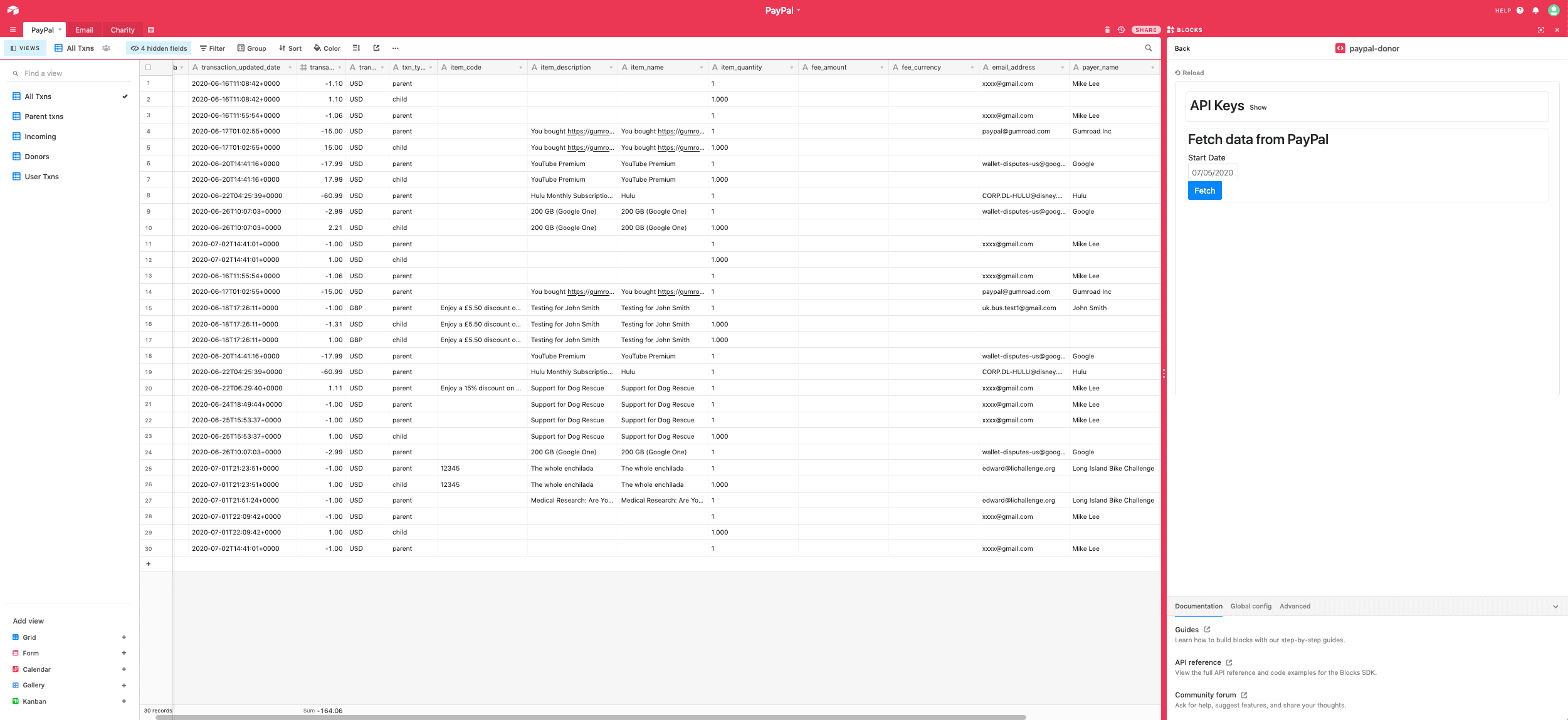
A lot of small charities take donations through PayPal because it's easy to set up, then discover PayPal's own reporting stops at transactions — it has no concept of a donor, no gift history, and no way to see who your recurring supporters actually are. airtable-paypal-donor-management-system is an Airtable custom block that pulls raw PayPal transactions into Airtable and reshapes them into exactly what a donor management system needs.
What a Donor Management System Actually Needs
Before touching any code, it's worth being precise about what a donor management system is supposed to do — this isn't guesswork, it's what nonprofit fundraising platforms (Virtuous, Bloomerang, Blackbaud, DonorPerfect, Givebutter, Neon One) consistently describe as the core feature set:
- Donor profiles — contact info and identity tied to every gift, not just an anonymous list of payments.
- Gift/donation history — every donation a supporter has made, viewable as their own timeline.
- Recurring-donation tracking — sustaining/monthly donors are a distinct, high-value relationship, and platforms consistently treat linking a recurring gift to its donor as a first-class feature, not an afterthought.
- Segmentation and reporting — answering questions like "who has given the most" or "what did we raise this month" without hand-building a report for each question.
PayPal's own Reporting API gives you transactions. It doesn't give you any of the four things above — those all have to be built on top.
Built as an Airtable App
Building all four of those on top doesn't mean standing up a separate hosted application. Airtable Apps (what this project calls a "custom block" — Apps is the current name for the same platform) let you run a real React application directly inside a base, with the Blocks SDK giving that code live read/write access to the base's tables and its own settings storage. That makes it easy to remix what Airtable can do — reach out to an external API, reshape whatever comes back, and write the result straight into your tables — without hosting, deploying, or authenticating a server of your own. This project's source code is exactly that: an Airtable App, end to end.
Getting Access to PayPal's API
The block stores your PayPal REST API client ID and secret in globalConfig (Airtable Blocks' per-base settings store), then combines them into the base64 string PayPal's OAuth token endpoint expects for HTTP Basic auth:
const handleApiKeyChange = () => {
  const clientId = globalConfig.get(['paypal', 'apiKeys', 'clientId'])
  const secret = globalConfig.get(['paypal', 'apiKeys', 'secret'])

  const base64EncodedApiKey = btoa(`${clientId}:${secret}`);

  globalConfig.setPathsAsync([
    { path: ['paypal', 'apiKeys', 'base64Key'], value: base64EncodedApiKey}
  ]);
}
The settings UI is upfront about the tradeoff, with a visible warning right next to the input fields: anybody with write access to the base can see these values. That's a real security boundary worth knowing before you paste production API credentials into a shared base.
That base64 key is then exchanged for a short-lived OAuth access token via the standard client_credentials grant:
export async function getAccessToken() {
  const clientId = globalConfig.get(['paypal', 'apiKeys', 'base64Key'])

  try {
    const accessTokenResponse = await fetch(PAYPAL_ACCESS_TOKEN_URL, {
      headers: {
        Authorization: `Basic ${clientId}`,
        'Content-Type': 'application/x-www-form-url-encoded'
      },
      method: 'POST',
      body: 'grant_type=client_credentials&response_type=token'
    });
    if (!accessTokenResponse.ok) {
      throw accessTokenResponse;
    }

    const accessTokenJson = await accessTokenResponse.json();
    const accessToken = accessTokenJson.access_token;
    return accessToken;
  } catch (e) {
    const error = new Error('ACCESS_TOKEN_ERROR');
    error.message = 'Error in retreiving access token';
    throw error;
  }
}
PayPal's Reporting API Has a Narrow Date Window Too
Anyone who's worked with PayPal's Reporting API runs into the same shape of problem: you can't just ask for "everything." This block fetches in 5-day windows, and within each window it follows PayPal's own links.next cursor to page through all results before advancing the window:
export async function getAllPages(startDate) {
  let paypalStartDate = getPayPalDate(startDate);
  let paypalEndDate = getPayPalDateFiveDaysFromStart(startDate);

  let done = false;
  let allData;

  while(!done) {
    let fiveDaysData = await getDataForFiveDays(paypalStartDate, paypalEndDate);
    allData = updateAllPagesData(allData, fiveDaysData);
    if (shouldContinue(paypalStartDate, paypalEndDate)) {
      paypalStartDate = paypalEndDate;
      paypalEndDate = getPayPalDateFiveDaysFromStart(paypalStartDate);
    } else {
      done = true;
      break;
    }
  }

  return allData;
}

function getNextPageUrl(data) {
  const links = _get(data, 'links');
  const next = _find(links, (link) => {
    return link && link.rel === 'next'
  });
  return _get(next, 'href', '');
}
Small windows, real pagination inside each one — nothing exotic, but skip either half and large donation histories silently go missing.
Recurring Donations: Linking Parent and Child Transactions
This is where the "recurring-donation tracking" need from the research above actually gets built. PayPal tags each transaction with a paypal_reference_id_type. A value of SUB (subscription) or PAP (pre-approved payment) marks a transaction as the parent of a recurring gift; every later payment against that subscription references the parent's transaction_id as its own paypal_reference_id:
// paypal_reference_id_type enum('ODR','TXN','SUB','PAP','')
function formatTransactionsBillingAgreements(transactions) {
  let editedTransactions = _cloneDeep(transactions);
  const formattedTransactions = [];
  const txnDetails = transactions.transaction_details;

  for (let i = 0; i < txnDetails.length; i++) {
    const txnDetail = txnDetails[i];
    const transaction_info = txnDetail.transaction_info;
    const paypal_reference_id_type = transaction_info.paypal_reference_id_type;

    // SUB is a parent
    if (paypal_reference_id_type === 'SUB' || paypal_reference_id_type === 'PAP') {
      formattedTransactions.push({
        parentTxn: txnDetail,
        childTxns: []
      });
      editedTransactions.transaction_details.splice(i, 1);
    }
  }

  return {
    transactions: editedTransactions,
    formattedTransactions
  }
}

function formatTransactionsLast(transactions, formattedTransactions) {
  const txnDetails = transactions.transaction_details;

  for (let i = 0; i < txnDetails.length; i++) {
    const txnDetail = txnDetails[i];
    const transaction_info = txnDetail.transaction_info;
    const paypal_reference_id = transaction_info.paypal_reference_id;

    const index = _findIndex(formattedTransactions, (formattedTxn) => {
      return _get(formattedTxn, 'parentTxn.transaction_info.transaction_id') == paypal_reference_id;
    });

    if (index === -1) {
      formattedTransactions.push({ parentTxn: txnDetail, childTxns: [] })
    } else {
      formattedTransactions[index].childTxns.push(txnDetail);
    }
  }

  return formattedTransactions;
}
The result is a proper parent/child structure — one recurring donor, with every individual payment they've ever made nested underneath. That's the gift-history and recurring-tracking requirements, built entirely from fields already present on each raw transaction.
Extracting What a Donor Profile Needs
Each transaction gets reduced down to exactly the fields a donor profile needs — who gave, how much, in what currency, and when:
export function getItemDetails(txn) {
  const cartItemDetails = _get(txn, 'cart_info.item_details[0]');

  const cart_info = {
    item_code: _get(cartItemDetails, 'item_code'),
    item_description: _get(cartItemDetails, 'item_description'),
    item_name: _get(cartItemDetails, 'item_name'),
    item_quantity: _get(cartItemDetails, 'item_quantity'),
  };

  const payerInfo = {
    email_address: _get(txn, 'payer_info.email_address'),
    payer_name: _get(txn, 'payer_info.payer_name.alternate_full_name'),
    country_code: _get(txn, 'payer_info.country_code'),
  }

  const txn_info = {
    transaction_amount: Number(_get(txn, 'transaction_info.transaction_amount.value', '0')),
    transaction_currency: _get(txn, 'transaction_info.transaction_amount.currency_code'),
    transaction_updated_date: _get(txn, 'transaction_info.transaction_updated_date'),
  }

  return { ...cart_info, ...payerInfo, ...txn_info };
}
email_address is what makes a transaction a donor instead of just a payment — it's the field every other donor-facing feature (history, segmentation, outreach) ends up keyed on.
Why Airtable, Not a Custom Report Builder
Once a record is shaped, writing it to Airtable is almost anticlimactic:
export async function populateAirtableV2(txn) {
  const paypalTable = base.getTableByName('PayPal');
  try {
    await paypalTable.createRecordAsync(txn);
  } catch (e) {
    console.log('e ', e);
  }
}
That's the whole point of building this on Airtable instead of a bespoke app: the "segmentation and reporting" need from the research doesn't need a single line of custom report code. Once donor records land in a normal Airtable table, grouping by donor to see who's given the most, or filtering by date to see this month's total, is just an Airtable view — the block's only job is getting clean, donor-shaped data in.
The Full Picture
- Copy the base template, install the custom block
- Paste in your PayPal REST API client ID and secret
- Pick a start date and fetch — the block pages through PayPal's API in 5-day windows
- Subscription transactions get linked to their recurring payments; every transaction gets reduced to donor-shaped fields
- Records land in an Airtable table, ready for Airtable's own views to answer donor and reporting questions
None of this required building a donor CRM from scratch — just getting PayPal's raw transaction graph into a shape Airtable already knows how to report on.